Posts

How to motivate an Autistic person.

Image
Clarity and preparedness   If I have to travel anywhere new, I'll need plans. No one else's plan's, my own. In my old life, whenever we had meetings, a few members of our management team would always hook up with me. Marc, once told me, the reason he always jumped in with me was because I'd know exactly where the venue was, where the best places to park were likely to be, what time we would have to leave to arrive early, what the hotel was called, what the check in arrangements were and so on. He was right, I am wholly uncomfortable if I do not know any of this. Another colleague I work with now, Ken, has observed I'm very much a details guy. I have to know exactly what to do, I am pretty hopeless with any ambiguity, if it isn't totally clear, I flounder or stop dead in my tracks.  Likewise, with the En suite we're having installed, I have to know exactly, what tiles we're having, what toilet, tap, shower, etc and until that's all decided and written...

Audiophile music streaming and the best, if odd, way to listen to it.

So last year after buying a fantastic MacBook Air M1 I got a free trial of Apple Music. I let it run it course and during the trial I played around with Lossless, (as well as Dolby Atmos) and was blown away by the difference in quality over my MP3 collection (not Atmos, that sounded rubbish). I've defended MP3 for many years, mostly for the convenience, but this new Lossless, highlighted a new modern way of enjoying music, convenience & having outstanding sound quality too. Just before Christmas, I got another trial and this sold it, I needed this in my life, but infuriatingly most of my streaming music was on Spotify, so, I did a back to back. I dug around and I found out some stuff.  After the Apple Music trial, I found a great deal via PayPal for a three month trial with Spotify, this would allow me to unlock the full HD music Spotify don't let their free customers enjoy, but, it was no use. On the first night it just felt, somehow flat, a little investigation informed m...

Google Drive for Desktop.

Image
Google have given their popular Backup and Sync Software an overhaul and it's much more than just a facelift. Once installed I found the transfer from Backup and Sync to the new app pretty stress free. The odd 'login' bug, (after I'd already logged in), but otherwise the installation process is fairly painless, it even uninstalls backup and sync when you're finished. However, it doesn't remove the contents of your OLD Google Drive folder, and the way the new program works is significantly different. We'll come back to this later.  The old Backup and Sync created a duplicate folder on your device, simply called Google Drive. Everything you synchronised with Drive was available no matter what you were doing, if you were connected to the internet or not. What was Sync'd was available. Of course if those files were Google Sheets, or Docs, you'd need an internet connection to open them in Chrome (or Safari).  Your other docs, such as PDFs Word, powerpoint...

Dolby Atmos - Spatial Audio and Lossless.

Image
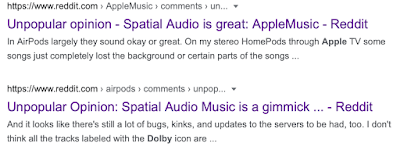
After treating myself to a new MacBook M1 Air earlier this month (For Minecraft Education sessions) I got a trial of Apple News, Apple Arcade and also Apple Music; 6 months in fact, so til the end of November. I know how these things work though and yes, they want me to make it part of my life so I feel like it's a huge loss in November and as a Music lover, I'm keen to explore the service and being a tech-head, I'm especially keen to play with the new Dolby Atmos music or Spatial Audio as Apple are calling it.  There's only a limited amount of content available in Atmos at the moment, but unless you've had a bucket on your head for the past 100 years, some of the albums you'll likely be familiar with. Like Sgt Pepper for example. To listen to the difference I used my Beats Studio headphones and some V-Moda crossfades, both great headphones although they're getting on a bit now.  Sgt Pepper was a tremendously produced album to start off with, so it's a g...

Current Minecraft Worlds - Evaluation and issues.

Image
I've been spending a lot of time looking at some of the worlds available in Minecraft Education Edition. There's a buzz around a number of them and I've downloaded them to play them through so I'll know before students, what to expect. I want to keep notes, but I also thought these notes might be useful for others.  Adventures in English - Cambridge Assesment  https://education.minecraft.net/lessons/adventures-in-english Very simple play through, but quite long. Play starts outside a Library which is supposed to be closed, this world is unique in as much as the characters not only have dialogue boxes, but they actually talk. There are a number of logical challenges in the game, mostly simple spelling but young players might get stuck near the beginning as letters that need to be found in the library are scattered around, but the last one is hidden in a chest, this took me a long time to find. Perhaps a class might find it quicker and once the location is known other wil...

I'm amazed by tech #1

Image
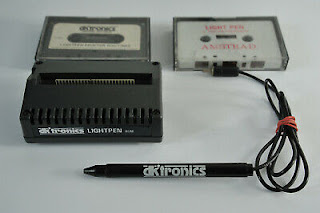
I often reflect back on my childhood and how the devices and technology we're using now, would literally blow my mind. When I was around 14 got my first 'PC'. Although it wasn't a PC, it was an Amstrad CPC 464. Without getting hung up on the staggering difference in storage size, processor speed and operating systems from this and more modern PCs, it used normal cassette tapes to load programs. Albeit from it's in built tape recorder; a cutting edge innovation of it's time. Two curly cords connected the Monitor to the 'Computer' which was built into the keyboard, which again, was staggeringly innovative for the mid eighties. I remember I had a cartridge which plugged into the back of the keyboard with vents in to keep it cool, this had a lead going to a device that reminded me of a berol note writer pen, without a nib. Inside was a small sensor which knew which part of the screen it was looking at. Completely inaccurate, this ' light pen ' manage...

Simple laptop buying advice.

If you're not on a budget, buy a Mac and don't worry about the specs.  Mac computers are the user friendly alternatives to PC's. They're quicker to learn, more intuitive, and less prone to failure. People may disagree, but I've been using them for over 10 years and they're my go-to solution for everything.  If you are on a budget, let's keep this simple, if you've found a website that sells laptops, it's likely got some filters on it, here's what I'd set my filters to, if I was looking for the best value for money I could find. For each category, the filter I'd set is in bold. In order of importance.  Select the Laptop/Windows option.  Windows PC's do everything a Chromebook can, and more. Chromebooks used to be significantly cheaper, now that seems less like that's the case. Be on the lookout for Windows S though, it only allows apps to be installed from Microsoft marketplace.  Number one priority Buy a machine with an SSD (sol...

You should love the S21 ultra; but you probably shouldn't buy it.

Image
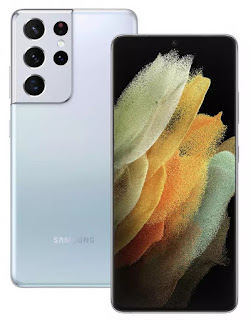
Ok, so I admit, the features the Samsung S21 Ultra has are great. Let's look at them The handset has a beautiful AMOLED screen . For those of you who haven't upgraded to the latest iPhone you may not know that OLED screens look amazing. Individual pixels can be turned off completely, this means it's much better for battery life than an LED screen. Blacks looks blacker and you also get the 'always on' feature that allows you to see your clock and notifications even when your phone is off. Very cool.  Edge to edge display . This too is a great feature, a lovey design I like it a lot. A wide angle lens, a telephoto lens and a normal lens on the camera. Superb for snapping creatively.  Support for the S-Pen . having a pen on a smartphone can make workflow much much easier. Taking portions of screenshots, and annotating them is also really useful.  A big battery , anything north of 4500mah in an android phone is going to give you genuine all day functionality.  A fing...

Aerial Photography & Video in 2021

In 2021 UK drone regulations are changing in a significant number of ways to bring them more in line with the EU.  With a number of caveats, Permission for commercial operation (PfCO) is no longer strictly required, although to acquire aerial images and/or video, insurance will be. The law still requires that pilots of larger drones, without PfCO, maintain 50m clear of buildings, people, property (such as cars) and 150m clear of urban, built up areas and do not fly over crowds of people ever, however if the drone is under 250g those rules do not apply, quote 'for short periods of time'.  Verbatim, from the CAA  "The (new) rules are based on the risk of the flight; where you fly, proximity  to other people and the size and weight of your drone" Pilots who have previously passed courses and flight tests might well find that their insurance quotes are significantly less than those who have no experience or qualifications. I have had a quote for one days work which has e...

Google are losing all of their Unique Selling Points.

Image
There was a time when you were looking for a technical solution that Google had a handy and convenient answer.  Music, Photos and Files. Google had the solution, but as time has passed, all of these solutions are now past their best. Let's have a look at what they were and why they're no longer worth our time.  Google Music This used to be a great way to sync/backup your music collection and stream to your mobile device without eating into any of the storage on your phone, Great when storage was only 8 or 4Gb. You could also stream audio, from your laptop or device to your Chromecast plugged into your hifi at 320kbps and browse your collection with ease.  Google Music is dead though and has now been replaced by the much more inferior YouTube music service. Much like Apple Music and Spotify, primarily it is now a streaming service you pay for. While you can transfer your files across from Google Play Music, the interface is aimed at the subscriber, and limitations on ...

Now Google are going to charge for Photos.

As has become the pattern with Google, the freemium products that entice you in to use their services and devices, like Google Music, manifest to become something utterly useless, unless of course you pay. But now, with Google Photos even if you pay, that service is still going to become useless, until you pay some more, and the year after that, even more and so on... I love convenience and if there's a solution that offers it, I will usually be an early adopter. Google Music was tremendous as it let you synchronise the music on your computer, with a cloud based service so you could access your entire music collection from your (Google) Android device. That switched to YouTube music, a service that is worse in every respect. Lower streaming quality, a dreadful interface, and no more streaming from your phone to your Chromecast Audio that you bought in good faith.... from Google.  And the same thing is happening with Google Photos. That superb service that allowed you to easily back...

Transferring video files without losing quality.

Image
Over the past few weeks and months I have been asked to produce a number of videos for virtual events. For some I have done the filming which makes things super easy, but for others I have collated clips made by the clients. For some the most convenient way has been to use Google Drive, Microsoft One Drive or another cloud based storage solution, which from a Laptop or Desktop computer isn't too much of a problem. But capturing video on a mobile device makes so much sense, as the camera quality can be exceptional, and when paired with a lapel mic (which can be used with 99% of smartphones nowadays), a tripod and some natural light, near professional results aren't too difficult.  But unless you're an everyday user of Google Drive, or Dropbox then transferring that video can prove tricky. Using Whats App or Email usually compresses the video to an unacceptable degree. Resolution is lost, sharpness is lost and the effort you put in, to get clear audio, can also be lost.  So w...

Why my phone purchase gave me sleep anxiety.

Image
I've had my Samsung S7 edge since 2017 and for the most part it's been a solid purchase. It's a beautifully designed phone in gold, with wireless charging, fast performance, a tremendous camera an IP68 rating, glass rear, fingerprint sensor in the button, heart rate and O2 sensor. But now with my high usage, the battery is starting to let me down. Buying a replacement for a flagship handset has been a challenge. Upgrades should have all of the features of your old phone and then some, right? Well, I also have a general rule which makes things far more difficult, I don't take contract phones (I have a £10 12Gb 30 day Sim deal from Voxi  [voda] which is fine thanks, use link for the same deal and a £10 amazon voucher) and I don't buy phones for more than £500, in fact the S7 Edge was a bargain as I bagged it in a a Black Friday event for less than £380, so finding a replacement for this has been eye opening. The assumption that flagship features move down onto cheaper...

Hwb email forwarding

Image
So my Mum is a retired headteacher, although you would struggle to notice as she volunteers her time to a local school as a teacher, and like many, uses Hwb. She does however struggle with her email, as a non smartphone user, she hasn't configured her mail app to use it so, apparently, their school secretary emails her on her personal email, to let her know when she has email in her Hwb account. Then, my Mum will open her computer, click on her saved link, login to check, read and respond.  Hardly convenient.  Like my Mother, and presumably many others, I do not use my Hwb email as my primary account, so I have set up email forwarding. This means when an email comes in, I will instantly receive a copy on my school email and I can respond accordingly. Without the need for our school secretary to get involved.  So how is this done? So for my Mum and anyone else who needs it, it's done like this.  Log in to Hwb and navigate to Outlook. In the top right, click the Gear i...

A satisfactory solution to the demise of Google Play Music

Image
For generations before music streaming every record on earth became a thing, there have been music lovers known as collectors. Discerning music lovers who will audition, listen, share, and ultimately 'collect' albums to add to their ever growing library. People who would selectively spend their money on supporting artists they loved, by buying albums instead of paying subscriptions to global corporations who are known to pay a pittance to artists .  Collectors total album count are their badge of honour, their knowledge of each artist and history, their passion. In the 1970s Vinyl was the collectors medium of choice. For portability in the early 80's Cassette's become almost as popular (although not for the true audiophiles). Then in the mid 80's the Compact Disc became the long term winner for many millions of collectors and in the late 90's MP3 made it's first appearance. With low bandwidth and small hard disk drive sizes, the best we could realistically h...

Youtube Music is nothing compared to Google Play Music.

The transfer is complete, my music collection that I have enjoyed listening through Google Play Music for the best part of a decade has now moved to the new improved cash machine that is Youtube music.  The end of an era, the end of listening to albums cast to my hifi at 320kbps.  So what is my problem with Youtube Music? Let's start with the least infuriating feature. Finding an individual album (that I own and have uploaded) is now incredibly difficult. Albums and Artists are listed on separate tabs. Tap either, through the web or the app, and you're presented with the YouTube Music Artists you have bought, which is none, so I have to manually switch it to uploaded. If I'm looking at Albums, they're not listed in artist order, but album title. With 10,000 songs, that's a lot of albums to scroll through and loading time isn't great, so getting to 'The Seldom Seen Kid" or anything lower down in the alphabet takes forever. But there is an easier way, bei...

My suggestions for avoiding problems with Google Drive shared folders.

As I have recently found out, having a team member leave a shared Google Drive can be infuriatingly complex . The best way to handle a shared Google Drive is by using an admin account for the organisation. All of the folders within a share, should be managed by this one account. If they are created by the key member representing the organisation, then the sharing permissions for the folder can be managed by the admin. The admin can remove people from the share, or share the folder or files with other people. Other team members should not create new folders within the Parent folder. Other team members should, as a matter of course (for their sake as well as the organisation, upload folders, but as a matter of habit, make the owner of the file or folder the orgnisation's admin account. If you already have an active share with hundreds of valuable files, between a number of people, then you can prepare for future issues (someone moving on) in a couple of ways. There may be better ways...