Posts

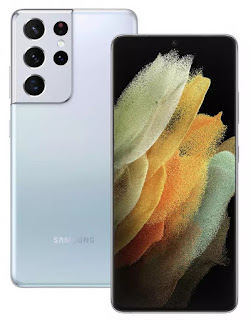
You should love the S21 ultra; but you probably shouldn't buy it.
Image
Ok, so I admit, the features the Samsung S21 Ultra has are great. Let's look at them The handset has a beautiful AMOLED screen . For those of you who haven't upgraded to the latest iPhone you may not know that OLED screens look amazing. Individual pixels can be turned off completely, this means it's much better for battery life than an LED screen. Blacks looks blacker and you also get the 'always on' feature that allows you to see your clock and notifications even when your phone is off. Very cool.  Edge to edge display . This too is a great feature, a lovey design I like it a lot. A wide angle lens, a telephoto lens and a normal lens on the camera. Superb for snapping creatively.  Support for the S-Pen . having a pen on a smartphone can make workflow much much easier. Taking portions of screenshots, and annotating them is also really useful.  A big battery , anything north of 4500mah in an android phone is going to give you genuine all day functionality.  A fing...

Aerial Photography & Video in 2021

In 2021 UK drone regulations are changing in a significant number of ways to bring them more in line with the EU.  With a number of caveats, Permission for commercial operation (PfCO) is no longer strictly required, although to acquire aerial images and/or video, insurance will be. The law still requires that pilots of larger drones, without PfCO, maintain 50m clear of buildings, people, property (such as cars) and 150m clear of urban, built up areas and do not fly over crowds of people ever, however if the drone is under 250g those rules do not apply, quote 'for short periods of time'.  Verbatim, from the CAA  "The (new) rules are based on the risk of the flight; where you fly, proximity  to other people and the size and weight of your drone" Pilots who have previously passed courses and flight tests might well find that their insurance quotes are significantly less than those who have no experience or qualifications. I have had a quote for one days work which has e...

Google are losing all of their Unique Selling Points.

Image
There was a time when you were looking for a technical solution that Google had a handy and convenient answer.  Music, Photos and Files. Google had the solution, but as time has passed, all of these solutions are now past their best. Let's have a look at what they were and why they're no longer worth our time.  Google Music This used to be a great way to sync/backup your music collection and stream to your mobile device without eating into any of the storage on your phone, Great when storage was only 8 or 4Gb. You could also stream audio, from your laptop or device to your Chromecast plugged into your hifi at 320kbps and browse your collection with ease.  Google Music is dead though and has now been replaced by the much more inferior YouTube music service. Much like Apple Music and Spotify, primarily it is now a streaming service you pay for. While you can transfer your files across from Google Play Music, the interface is aimed at the subscriber, and limitations on ...

Now Google are going to charge for Photos.

As has become the pattern with Google, the freemium products that entice you in to use their services and devices, like Google Music, manifest to become something utterly useless, unless of course you pay. But now, with Google Photos even if you pay, that service is still going to become useless, until you pay some more, and the year after that, even more and so on... I love convenience and if there's a solution that offers it, I will usually be an early adopter. Google Music was tremendous as it let you synchronise the music on your computer, with a cloud based service so you could access your entire music collection from your (Google) Android device. That switched to YouTube music, a service that is worse in every respect. Lower streaming quality, a dreadful interface, and no more streaming from your phone to your Chromecast Audio that you bought in good faith.... from Google.  And the same thing is happening with Google Photos. That superb service that allowed you to easily back...

Transferring video files without losing quality.

Image
Over the past few weeks and months I have been asked to produce a number of videos for virtual events. For some I have done the filming which makes things super easy, but for others I have collated clips made by the clients. For some the most convenient way has been to use Google Drive, Microsoft One Drive or another cloud based storage solution, which from a Laptop or Desktop computer isn't too much of a problem. But capturing video on a mobile device makes so much sense, as the camera quality can be exceptional, and when paired with a lapel mic (which can be used with 99% of smartphones nowadays), a tripod and some natural light, near professional results aren't too difficult.  But unless you're an everyday user of Google Drive, or Dropbox then transferring that video can prove tricky. Using Whats App or Email usually compresses the video to an unacceptable degree. Resolution is lost, sharpness is lost and the effort you put in, to get clear audio, can also be lost.  So w...

Why my phone purchase gave me sleep anxiety.

Image
I've had my Samsung S7 edge since 2017 and for the most part it's been a solid purchase. It's a beautifully designed phone in gold, with wireless charging, fast performance, a tremendous camera an IP68 rating, glass rear, fingerprint sensor in the button, heart rate and O2 sensor. But now with my high usage, the battery is starting to let me down. Buying a replacement for a flagship handset has been a challenge. Upgrades should have all of the features of your old phone and then some, right? Well, I also have a general rule which makes things far more difficult, I don't take contract phones (I have a £10 12Gb 30 day Sim deal from Voxi  [voda] which is fine thanks, use link for the same deal and a £10 amazon voucher) and I don't buy phones for more than £500, in fact the S7 Edge was a bargain as I bagged it in a a Black Friday event for less than £380, so finding a replacement for this has been eye opening. The assumption that flagship features move down onto cheaper...

Hwb email forwarding

Image
So my Mum is a retired headteacher, although you would struggle to notice as she volunteers her time to a local school as a teacher, and like many, uses Hwb. She does however struggle with her email, as a non smartphone user, she hasn't configured her mail app to use it so, apparently, their school secretary emails her on her personal email, to let her know when she has email in her Hwb account. Then, my Mum will open her computer, click on her saved link, login to check, read and respond.  Hardly convenient.  Like my Mother, and presumably many others, I do not use my Hwb email as my primary account, so I have set up email forwarding. This means when an email comes in, I will instantly receive a copy on my school email and I can respond accordingly. Without the need for our school secretary to get involved.  So how is this done? So for my Mum and anyone else who needs it, it's done like this.  Log in to Hwb and navigate to Outlook. In the top right, click the Gear i...