Posts

Uploading your class to Google GSuite admin for Schools.
Image
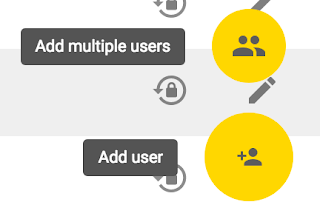
If your school has Chromebooks or anything that uses Google services, at some point, either as a head or an IT leader, you're going to realise you need to upload your entire school to Google Admin console. This can seem like an overwhelming task. You could input this information pupil by pupil (not advised) or you can upload a .csv ('comma separated value file' or 'spreadsheet').  Stay with me, it doesn't matter if you don't know what this means or not.  You also need to input every pupils email address, and create a unique password for them. Imagine trying to make 200-300 passwords up! Doing this manually is a wicked waste of any teacher or secretaries time. So I'm going to share my tips for simplifying this seemingly overwhelming task.  1 DOWNLOAD THE TEMPLATE Fig 1 Login to you google admin console. Click Add Multiple users. (see fig 1 - this option only shows up under USERS and the top level of the organisation).  Select add mul...

Microsoft Store Customer Care.....

Image
So; family sharing. Setting up a family account with either Google, Apple or Microsoft has a number of benefits, for example locating your kids (and wife), controlling PC access, checking web history, setting parental controls and generally looking after your family online. Plus, the great benefit of sharing apps between a number of family devices. For example; Minecraft , which our family is heavily into, having built  @chester_craft on Xbox 360 and having over 2 million downloads via maps for minecraft on Android (Search Chester if you want it for free). We've used family sharing on Apple devices in the past, Downloading Minecraft on the Parent iOS device, and easily downloading it for free on a childs device. However everything over at Apple hasn't always been plain sailing, sometimes I've had problems with purchases, which have needed rectifying. Once my very young daughter inadvertently bought £12 of in app purchases (while in app purchasing was still in it...

How to smackdown ransomware forever.

Image
If your local ATM display showed that it had a virus would you be worried about your bank balance? I'd assume the answer is 'of course not'. As you'd know the bank would be keeping it safe. If the worry of a ransomware attack on your computer concerns you, then it's possible you may want to rethink the way you manage your files. Cloud based storage has existed in various guises for many years now. The first service I used was Dropbox. Google are now (in my opinion) market leaders in this respect, with Microsoft a close second. iCloud is sadly too dependant on Apple powered devices to be taken seriously, where as the other solutions are happy on a number of platforms; including Apple. If you still use 'my documents' or your home folder on your computer to store your most important documents, or worse still, your desktop, then ransomware will still most likely be a worry. This will be more true if you don't keep regular backups of your data. However, O...

Is it easy flying a drone?

Image
This is a question I get asked more often than most others. And for the part, I answer without thinking. Yes, I say, If you can fly one of the cheaper drones, you'll find the more expensive one's simple. And to a degree that's true. The smaller £30 drone's like the one I started with, the Hubsan H107 is a real handful. In fact the first time I took it out, a few days after Christmas (wihtout my glasses on) I lost sight of it at about 50ft, the wind got hold of it and I spent the next 40 minutes traipsing round a field looking for the little flashing lights, which fortunately, because of the quick loss and lack of power going to the motors were still flashing. (They usually only last 6-7 minutes). The reason the smaller drones are harder to control (and thus better to practice with) is because they don't carry any technology that would aid the pilot. No GPS, no ultrasonic or visual sensors, no altitude controls or compass, although the Hubsan does have a gyrosc...

Why should I pay..... again?

Image
It's important if you're going to hire a drone operator that he or she, or the business that they represent are properly insured and qualified. I know this, and hopefully those who hire drone operators to carry out any work for them, know this as well. How you go about finding a legitimate drone operator is more of a quandary. There are now a number of drone registers appearing who will put the customer in contact of a legally qualified operator. Regardless of the size of the work or the location in the UK, these drone registers will point you in the direction, or let you search on their website for a local drone operator to you.  For those of us running a one man show; who look after the site survey, risk assessments, video capture, flight, equipment, video edit, final production and delivery, who can keep the cost low for clients, this is a considerable additional expense, especially if we decide to register with more than one.  But how do small businesses get f...

Rough Cuts Ltd is moving.

Image
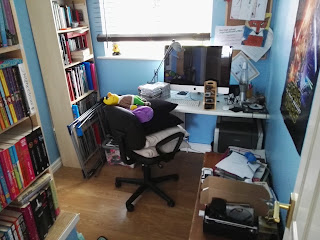
"Cramped and too blue" the old Rough Cuts HQ It's been a great year for Rough Cuts Ltd. In under a year from first becoming registered they've gone from zero turnover to some . In light of this success, and due to increasing levels of complaints from their employee. They're moving offices. From it's inception Rough Cuts has operated from a combination of ' the sofa' and the main offices upstairs in what was previously known as 'the old playroom'. Employee complained that it was too cramped, too blue and that the feng shui was all wrong, he said [quote] "I hate sitting with my back to the door it's creepy, and the blue, it looks like we stole it off the navy". Company directors maintain that the offices (at the time) we're fit for purpose and that 'employee' was the lead designer for the project some 8 months ago. Nevertheless due to increasing use of 'sofa' the business has acquired new property. Surr...

Setting up a new Windows computer - to do list.

Buying and setting up a new computer is a big pain in the bottom. If you're planning on treating yourself to a shiny new laptop this summer, then there is a whole host of things you'll need to do before you can start using it as your main machine.  I've just helped my two daughters set up their new machines and realised what a faff it is, if you're not really sure where to start. I tend to do myself a personalised 'to do' list, but, if, like my two daughters, you're at a bit of a loss where to begin, then hopefully, this might help.  1) Update The first thing the PC will most likely convince you to do, is several minor and perhaps major updates. If, (like me) you're a bit of a bargain hunter, then it's likely your PC will have been in storage for some amount of time. During that period, Microsoft boffins will have been releasing updates to their software, to iron out bugs and introduce improvements to make your machine, and millions like it, run...